Home » student engagement
Category Archives: student engagement
Doing Cultural Studies 2013 Roundtable: Academic Career Practice
On 3 December 2013 I had the pleasure of participating in the Doing Cultural Studies: Interrogating ‘Practice’ symposium backed by the CSAA and Swinburne University, and very professionally organised and run by the postgraduate trio Jenny Kennedy, Emily van der Nagel and James Meese. The day highlighted some impressive emerging work by postgraduate students and early career researchers in cultural studies, and featured an outstanding Keynote provocation by Katrina Schlunke (video here).
For a taste of the many excellent paper presentations, Jenny Kennedy created a Storify which curates many of the tweets from the day.
My contribution was as part of a panel addressing Academic Career Practice which was addressed more practical questions about balancing research, careers and teaching. The panellists were myself, Esther Milne and Brendan Keogh, with Ramon Lobato chairing. A recording of the panel discussion is below:
National Teaching Award!
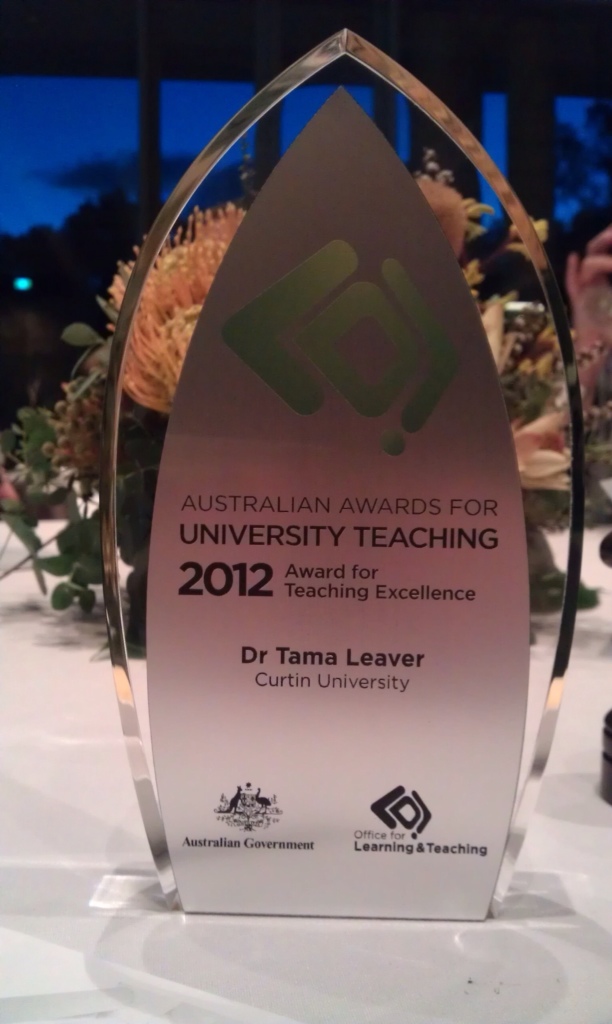
At an amazing ceremony and dinner at the National Gallery in Canberra tonight I was surprised, flattered and delighted to receive an Australian Award for University Teaching in the Humanities and Arts. This is a huge honour, and I’m extremely grateful to have my approaches to learning and teaching acknowledged in this manner. That said, I’m incredibly conscious that no one teaches in a vacuum, and in Internet Communications I am but one cog in a very complex and well-maintained machine, so this award is at least as much testimony to all of our team at Curtin University as it is to me.
Most importantly, though, I wanted to publicly thank the students who offered their thoughts and feedback about my teaching. We live in an era where students get asked to fill in an awfully large number of feedback forms, surveys and evaluations, so adding even one more thing to that pile is a big ask. So, THANK YOU to all of my students, current and past, whose kind words led to this award.
I’d also like to think that this award is a reminder that despite the huge media attention being paid to MOOCs and so forth, quality online education has been available and refined over more than a decade, and our Internet Communications program is one such example. I truly hope that as this next generation of online learning matures, close attention will be paid to successful examples already available! Successful learning and teaching is, after all, built on understanding the successes and failures of the past.
CFP: An Education In Facebook?
Along with my colleagues Mike Kent and Clare Lloyd we’re working on an edited collection about the joys, perils and uses of Facebook in higher education (of any sort). Here’s the CFP (call for papers) if you’re interested. Please feel free to distribute this post wide and far if you’d be so kind!
An Education in Facebook?
Higher Education and the World’s Largest Social NetworkEditors: Dr Mike Kent, Dr Tama Leaver and Dr Clare Lloyd, Internet Studies, Curtin University
Abstract Submission Deadline 18 January 2013
Full Chapters Due 31 May 2013
We are soliciting chapter proposals for an edited collection entitled An Education in Facebook? This edited collection will focus on the relationship between Facebook and Higher Education. Facebook first emerged in 2004 as a social network for students studying at universities in the United States. It soon grew beyond North America, and beyond the confines of student networking. Having evolved initially as a student social space the platform continues to play a prominent role in the lives of many students and staff at higher education institutions.
The collection will explore the use of Facebook the higher education environment as both a social space, and also its growing use as part of teaching and learning processes, both formally and informally. From students creating informal social groups around a course of study or particular unit, and dedicated online study groups, to the use of Facebook as a formal venue for teaching, we are seeking chapters that explore these and related areas.
Is there an appropriate place for Facebook in formal higher education? What are the tensions between private and professional spaces online for students and teachers and what are the potential dangers of unintentional overlap? What are appropriate roles and responsibilities for staff, students and institutions in relation to the social network? What are the dangers of moving important aspects of the higher education learning environment to an external company that exploits social interaction for profit? How is the shift to online learning in many institutions complemented or challenged by mobile uses of social networks, including app use on smartphones and tablets? This book will explore these and other topics interrogating the contemporary role of Facebook in Higher Education.
Some suggested topics (which are by no means exhaustive):
- · Facebook and/as/or Learning Management Systems?
- · Facebook as support network (for online and overseas learners, for example)
- · Teacher-led Facebook uses as in/formal learning
- · Student-led Facebook uses as in/formal learning
- · Case studies of Facebook implementation in formal learning
- · Informal versus formal learning online
- · Social networks and the flipped classroom
- · Context collapse
- · Privacy issues in social network use
- · Copyright issues in social network use
- · Mobile learning
- · The Facebook App in education
- · Roles and boundaries in networked learning
- · Facebook as a backchannel (either positive or disruptive)
- · The politics of ‘friending’ in staff and student relations
- · Examples of innovative Facebook integration in higher education
- · Whether Facebook has a place in formal education
- · MOOCs and Facebook
- · Comparative uses of Facebook and other online networks (eg Twitter)
Submission procedure:
Potential authors are invited to submit chapter abstract of no more than 500 words, including a title, 4 to 6 keywords, and a brief bio, by email to both Dr Mike Kent <m.kent@curtin.edu.au> and Dr Tama Leaver <t.leaver@curtin.edu.au> by 18 January 2013. (Please indicate in your proposal if you wish to use any visual material, and how you have or will gain copyright clearance for visual material.) Authors will receive a response by February 15, 2013, with those provisionally accepted due as chapters of no more than 6000 words (including references) by 31 May 2013.
About the editors:
The three editors are from the Department of Internet Studies at Curtin University. Dr Mike Kent’s research focus is on people with disabilities and their use of, and access to, information technology and the Internet. He recently co-authored the monograph Disability and New Media (Routledge, 2011). His other area a research interest is in higher education and particularly online education. Dr Tama Leaver researches online identities, digital media distribution and networked learning. He previously spent several years as a lecturer in Higher Education Development, and is currently also a Research Fellow in Curtin’s Centre for Culture and Technology. His recent book is Artificial Culture: Identity, Technology and Bodies (Routledge, 2012), and he is currently co-authoring a monograph entitled Web Presence: Staying Noticed in a Networked World. Dr Clare Lloyd specialises in mobile communication and mobile media. Her recent publications include the co-authored papers ‘Consuming apps: the Australian woman’s slow appetite for apps’ (2012); and ‘Fun and useful apps: female identity construction and social connectedness using the mobile phone’ apps’ (2012).
Developing a Web Presence During Candidature
I gave a short seminar today on the topic of developing a web presence during candidature. Honours, masters and doctoral students increasingly need to be aware of the tools and conventions that most directly allow them to be part of their scholarly field online. Hopefully this presentation gave some students here at Curtin some beginning ideas. I fear the slides are somewhat less useful without the presenter, but on the off chance they’re useful to anyone, here you go:
As always, comments are most welcome.
State of the Internet (in 4 minutes …)
As I welcome 300 students into Web Communications 101 at Curtin University today (both on-campus and via Open Universities Australia), my mind is already wandering to lectures and finding engaging ways to present the material. With that in mind, there are some nice infographics in this 4 minute video by Jesse Thomas which gives a wrap-up of the ‘State of the Internet’ (a la 2009):
JESS3 / The State of The Internet from Jesse Thomas on Vimeo.
Of course, 2009 internet stats are already getting dated, but the video is very pretty! 🙂
The Creative Commons: An Overview for Educators
[This post was originally published in Screen Education, 50, Winter 2008, pp. 38-42. It is reproduced here with permission. The article was (and is) aimed at media teachers in Australia, but hopefully may be of use more broadly, too.]
As teaching media and, more to the point, teaching media literacies becomes more and more central in both K-12 and tertiary settings, one of the biggest challenges is the gargantuan monolith of copyright. By copyright, I don’t necessarily mean teaching how copyright works – although that certainly isn’t the most straight forward process – but of more difficulty are the roadblocks that copyright laws puts in place. Immediately some canny readers will retort that most Australian schools and universities have access to particular exceptions which allow students to access and use material which, in any other context, falls under the rubric of All Rights Reserved. These exceptions are certainly very useful, but for the purposes of this article I’m relying on the notion that to be truly literate, skills must be transferable to the world outside of education. After all, if we taught our students to write and spell but told them they couldn’t use the alphabet outside of school grounds, basic literacy for all would never have caught on!
Media, of course, doesn’t have just one alphabet; as an idea, in practice, and even the literal meaning of the word reminds us that media is multiple. That multiplicity holds particular challenges for education. How, for example, do we teach students to integrate sound, still images, moving images and text without spending enormous amounts of time creating each of these media forms individually? One option is to teach the theory behind media production without including practical elements. However, as contemporary pedagogical theory and most practicing educators would agree, the best way to help students fully understand and engage with a particular concept or area is to put that notion into practice. It follows, then, that while media literacies can be taught by just analysing and critiquing films, television and video, often the most profound way to engage students in developing critical understanding of the media is when students create their own. So, what’s needed then is access to media which students can use, adapt, remix and build upon which isn’t All Rights Reserved. Sure there’s material that’s in the public domain and has no copyright restrictions, but it takes a very long time for most media to enter the public domain these days (different media forms take different lengths of time, but 70 years or longer is the length that film, television and music remain off limits). More to the point, even though copyright is automatically assigned as soon as a work is made these days, many creators want others to be able to re-use their work in particular ways. That’s where the Creative Commons organisation becomes important, along with the range of copyright licenses they’ve developed which can allow creators to be a lot more specific about how their creative work can be re-used following the principle of Some Rights Reserved.
What Is It?
In a nutshell, the Creative Commons organisation began in 2001 with the explicit mission of trying to make innovation and creativity easier for the many people who create media which, to some extent, builds upon existing work. They recognised that because authors of creative work had only two choices when creating a piece of media – either following the All Rights Reserved model of full copyright or giving up any and all rights and putting their work in the Public Domain – these limited options meant most people went along with All Rights Reserved because they weren’t prepared to give up all of their rights as creators. Meanwhile, many authors said that they’d happily let others use portions of their work in specific ways – and when directly contacted often gave others explicit permission to do just that – but many people argued that a system which let authors say which freedoms they’d give to others would be make it a thousand times easier for new creative works to be made, remixing, mashing or borrowing from previous work. And that’s exactly what the Creative Commons organisation has done: they’ve developed a series of licenses that can let authors make clear what they’re happy for other people to do with that author’s work. While standard copyright notices make explicit what can’t be done with a particular work, Creative Commons licenses allow people to specify what can be done.
How Does It Work?
The Creative Commons organisation provides a set of simple-to-use tools which let authors specify the sort of things they will and won’t let other people do with their creative work. The fundaments of the Creative Commons licenses are these four elements:
- Attribution (BY): Attribution basically means that the author of a work must be acknowledged by anyone who uses that work in any way in the future.
- Non-Commercial (NC): Non-commercial simply means that the author’s work can be re-used but not for commercial purposes – ie you can’t make money selling this work as a whole or a derivative part of it in a new work.
- No Derivatives (ND): No derivatives means that you can’t alter the work and can only redistribute verbatim copies (so, for example, if it was a song you could download it, listen to it and share it, but you couldn’t take a sample from the song to use in your own work).
- Share-Alike (SA): Share-Alike specifies that any derivative works (ie a new work which includes this work in part or in whole) must be licensed in exactly the same way (so if the original license was a Creative Commons Attribution Share-Alike license, then the new work created must use exactly the same licensing conditions).
These elements can thus be combined in different ways to form six possible Creative Commons licenses:
- Attribution: The work can be shared, sampled, re-mixed and so on as long as the original author of a work is acknowledged.
- Attribution, No Derivatives: The original author of a work must be acknowledged and no derivative works can be created using this piece (ie it can’t be sampled, bits can’t be used in new works).
- Attribution, Non-Commercial, No Derivatives License: Same as the previous license but with the extra stipulation that the work cannot be sold or distributed in any commercial manner.
- Attribution, Non-Commercial License: As long as authorship is acknowledged, the work can be used in any non-commercial way, including being sampled, remixed and so forth.
- Attribution, Non-Commercial, Share-Alike License: The same term as above, but with the added stipulation and all derivative works must be licensed using exactly the same terms.
- Attribution, Share-Alike License: So long as the original author of the work is acknowledged, it can be used, sampled and re-mixed as long as new works containing this piece are licensed under exactly the same terms.
While these licenses might sound a little confusing at times, it’s useful to think of them as the engine of the Creative Commons car: they need to be there to make everything work, but you don’t have to understand them in great detail in order to drive. Indeed, Creative Commons have set up a very simple website to help people choose a license, which is at http://creativecommons.org/license/. To choose a license, people just need to answer whether they want to allow commercial uses of their work and whether the want to allow modifications of their work and the website shows you the most appropriate license, complete with detailed instructions on how to add this license to your work (where your work can be anything from a document to an mp3 music file to a whole website).
But Isn’t Creative Commons American?
While the Creative Commons organisation is, indeed, based in the US, the great news is that there are local Creative Commons teams in many countries, including Australia. Apart from being extremely loud and clear advocates for Creative Commons across the board, from education though to entertainment, Creative Commons Australia (CCau) have also successfully implemented a national version of the Creative Commons licenses. This means that as educators, we can be 100% sure that Australian Creative Commons licenses will definitely be recognised in the Australia legal system. (This is especially significant since so many of the frustrating ambiguities in this area come from the fact that copyright laws differ across national boundaries.) When selecting a Creative Commons license using the website mentioned above, it’s also possible to simply select which jurisdiction you want to the license to fall under (so for Australia students and educators, ‘Australia’ is probably your best bet!).
Creative Commons in the Classroom
So, as an example, lets say that you’re a teacher of an upper secondary media class and you’ve asked the students to work in teams to create a short, topical, news report in a video format. They’ve got video cameras and editing software so can shoot the majority of the story themselves, but find during editing they need a few more bits of media: some music to jazz up the opening sequence, a couple of still images to use as cutaways during an interview, and some historical footage of the Olympic games (these students are doing a report on the Olympics, it turns out). Moreover, these students are hoping to post their news report on YouTube when they’re finished, showing it to family and friends. So, they’re going to need sources of secondary material that they have permission to re-use.
To find material, the students are already ahead of the game and head directly to the Creative Commons search portal (http://search.creativecommons.org) and they find some ‘fanfare’ music perfect for their opening sequence (the music has a Creative Commons Attribution license). Then the students click on a separate tab to search for images and find two amusing little images of the Chinese Olympics Mascots (Fuwa) and these are licensed using a Creative Commons, Attribution, Non-Commercial, Share-Alike license. Finally, the students head over to the Internet Archive (www.archive.org) and find some historical footage of the first ever Olympic Torch relay from the 1936 Olympics in Germany; this footage is old enough to be in the public domain. These secondary materials are added in and a brilliant story about Australia’s anticipation of the Olympic games is completed. Since their teacher has explained a bit about copyright and the Creative Commons, these students scan their secondary media and realise that with a combination of one public domain media piece, one using a Creative Commons Attribution license, and two using Creative Commons, Attribution, Non-Commercial, Share-Alike licenses, that their resulting news report will also need to be also licensed using a Creative Commons, Attribution, Non-Commercial, Share-Alike. The students hop onto the Creative Commons website, find a nifty little graphic file detailing their license, and place it as the final frame of their Olympic News Story.
Now, with a news story which can legally be re-distributed (as long as they don’t make money off it), this group of students post their video on YouTube. Their parents and peers are deeply impressed as it’s a great news story, and their clear understanding of copyright looks very professional! More to the point, a few weeks later the group of students get an email telling them that another group of students on the other side of the planet, in Canada, have included a clip from this Olympic News Report in a new student project in Canada, just as the Creative Commons license on that video allows them to do. Back in Australia the students and their teacher glow with pride knowing that they’ve not only created a wonderful news story, but it has also contributed to the global community and has been creatively built upon by others!
Introducing Creative Commons to Students
So you’re convinced about the value of Creative Commons licensing but can’t work out how to introduce them to your students? Thankfully, the Creative Commons folks have a lot of great media introducing their ethos, practice and licenses, all accessible via http://creativecommons.org/about/. Of particular use are the comic books which explain Creative Commons licenses via a superhero story, and a series of short web-based videos which introduce key Creative Commons ideas and features. Indeed, two of the best of these videos were produced by the Creative Commons Australia team, featuring the quirky animated characters Mayer and Bettle!
Where To Start?
So, you’re ready to give Creative Commons a go in your teaching and learning? Then here’s a few useful websites to get you started:
- www.creativecommons.org – The main website of the Creative Commons organisation with mountains of information.
- search.creativecommons.org – The search engine maintained by the Creative Commons organisation which lets you easily search many different databases for different media forms, all with Creative Commons licenses.
- creativecommons.org.au – The home of Creative Commons Australia and local efforts to promote the use and ethos of Creative Commons down under.
- www.archive.org – The Internet Archive, one of the world’s biggest repositories of historical material, a lot of which is either in the public domain or uses Creative Commons licenses. The Internet Archive has a lot of historical video material.
- www.flickr.com/creativecommons/ – The Creative Commons section of the massively popular photograph-sharing website Flickr has literally millions of different images available under Creative Commons licenses.

Tama Leaver dot Net by Tama Leaver is licensed under a Creative Commons Attribution-NonCommercial-ShareAlike 4.0 International License.